

The other day I looked in a drawer and noticed my pink laminator and felt instantly annoyed. Why do you think it annoyed me? Go on, have a guess.
Perhaps you thought it was the colour; if so, you’re wrong. I really like the color, and mentioning it may have influenced your thoughts.
The real reason is both frustrating and a bit embarrassing, although it shouldn’t be. This was a couple of years ago, if not more—Fibro Fog and all that. My neighbour asked if I could laminate something for them.
I searched high and low and literally couldn’t find the laminator anywhere. I ended up ordering another one from Amazon (thank you next day delivery). A while later, after the return date, I checked that drawer and found the pink laminator. It wasn’t buried; there were just two items in that drawer. I either didn’t notice it or didn’t check that drawer.
Since then whenever I have looked in that drawer I have felt a bit of annoyance. This led me to thinking how many items in my possession could also be a duplicate. I especially indulge in the crafting category.
Add to this the fact that if my physical symptoms are getting worse there is a good chance the fog is too. Led me to realising that something had to be done. So the other day when I opened the drawer and felt annoyed, an idea hit me. I need a home inventory system.
What type of inventory?
The first decision was, did I want a digital or paper-based system? This was an easy choice for me; it had to be digital. Although I enjoy being creative and even writing at times. Digital is my default.
Choosing an app for my digital inventory.
So, the next thing I had to figure out was which app to go with. I decided not to add a new subscription payment and instead use an existing app I already have. I settled upon Obsidian as my choice for my digital inventory. Since they added the Base core plugin which is lightning fast at filtering through things, it just made sense. I have access to Obsidian on all my devices so it is easy to look something up.
What to record
Now I had an app sorted I needed to decide just what I was going to keep in it. There were some instant categories that I was not including. For example, food.
Don’t get me wrong if I was the cook I would have set up an inventory for food ages ago, but due to the Fibro I am not the cook, some occasional baking, with help, is the best I can manage. Obviously I was not going to log my husband’s possessions either.
So I decided to create some categories. Some things are already logged in other ways, like books and craft materials. This is what I have at this moment:
- Clothing
- Gadgets
- Stationery
- Toiletries
- Apps
But when other types of products arrive, I will create a category for them.
Category Bases
The beauty of Obsidian Bases is that every record is automatically added together until you filter things out. So that means that I could have a core of the same fields for most categories. If I wanted something different I could just add a new base. So far I have the following bases:
- Inventory
- Software
- Subscriptions
- Consumables (toiletries and cosmetics etc)
Category Fields
The Main Inventory
The main inventory base has the following fields:
- Name (file name default)
- Type
- Room
- Location
- Purchased
- Arrived
- Supplier
- Price
This Inventory enables me to do far more than my initial purpose. If I had just done that I would have used the fields: room and location. (The key fields to find where I had put the thing!) Without this note, I would forget that the cable tags are in the upstairs corridor bookcase, on the second shelf, far left.
But by adding the Supplier, Purchased and Arrival Dates I can use it to track things that I am waiting for. I can set up a filter to just see what has a purchased date and no arrival date.
It allows me to view my spending by product type separately from my finance tracking app, which has all my subscriptions and digital purchases. It is interesting to just see what physical items you have bought.
The base can also have different views, like table, card or list. I primarily use Table, but in the Inventory Base, I have a Wardrobe Selection that uses Cards to display clothing photos. As I shop online (for clothes it is SimplyBe) it was very easy to get the image from the website.
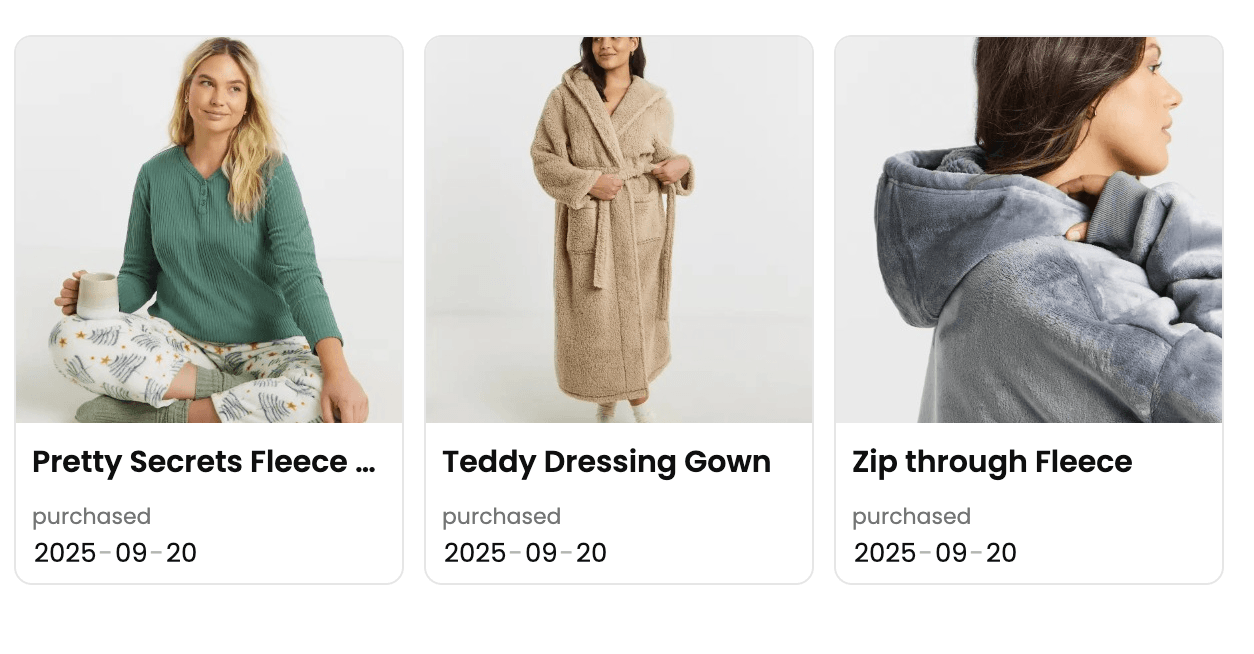
Thankfully I can buy things by instalment which allowed me to purchase the dressing gown and fleece at the same time. A dressing gown is a once in a decade type purchase.
Subscriptions
The subscription base has the following fields:
- Name
- Tags
- Price
- Renewal Period
- Renewal Date
Using Tags instead of Type allows me to add multiple purposes for a subscription, like Apple+ which offers file storage, music, and news.
Software
This is the simplest of the Bases; it just has the fields:
- Name
- Tags
- Installed Date
Consumables
Consumables is another simple one:
- Name
- Supplier
- Purchased Date
- Started Date
It’s Early Days
I don’t buy things very often due to my small budget. (So how do I have so much stuff!) So it is early days with my Inventory.
I’m working on a major decluttering effort, including a craft declutter that started nearly a decade ago but feels like it’s moving backwards. There is more on that in the post Learn how to shop your stash. This process has made me stop and think. When did I even get that, and why?
Include the reason why!
There are some purchases (and gifts) that are completely obvious. When I make an unusual purchase, I’ve started adding a note explaining my thought process behind the decision. Was I just thinking about the life I hoped to be living instead of my reality?
Also, when I installed a piece of software, who influenced me to download it? Thankfully I don’t have to record when I use it as there are other apps that do that for me. Making a note whenever I use an app would get old very fast.
Who needs two laminators?
I certainly don’t! It is my hope that as I add new purchases and existing items (with basic information, I am not going to start trawling through online shops looking for dates and prices). That I will never again find myself in a situation of purchasing something twice.
Do you need a home inventory system?
Are you concerned about duplicate purchases due to Fibro Fog and feeling motivated to start your own inventory? I’d love to discuss it with you over on one of the social channels where we can continue the chat. Or drop me a message on telegram if you don’t use social media.